


TattooInk: AI Tattoo Generator
4.368.00 Reviews
App Specs
- Version
- 1.2.0
- Updated On
- License
- Free
- Downloads
- 100,000+
- Developer
- leifhacks
- Categories
- Art & Design
- Platform
- Android
Screenshots
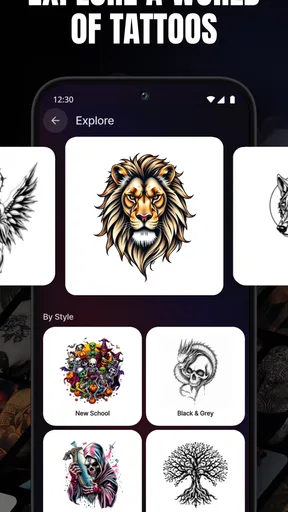
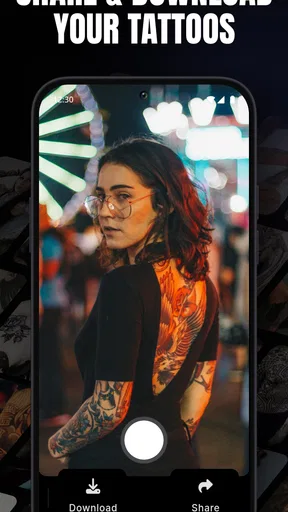
 Analysis by AppCompare
I like using a tattoo-design app best when I treat it as a sketchbook, not a shortcut to a finished tattoo. A generated image can help me find a direction, compare moods and work out what I want to discuss with an artist. It cannot settle questions of placement, longevity or how a design should follow the body. That distinction matters with TattooInk: AI Tattoo Generator: its appeal is the quick visual exploration, while the final choice still deserves time and a human tattoo artist’s eye.
A practical first pass, from idea to shortlist
My most useful starting point is a clear brief rather than a long stream of keywords. I decide what the central subject is, then add one or two details about style or mood. For example, if I were considering a small botanical tattoo, I might begin with the plant and a fine-line direction, then make a separate attempt with a bolder, more graphic feel. Keeping those ideas distinct makes it easier to judge what changed and which version is closer to what I actually want.
Once I have a few candidates, I would not simply pick the most elaborate image. I look for a readable silhouette, a clear focal point and enough open space that the idea does not depend on tiny decorative details. This is especially useful for small placements: a design that looks impressive on a bright phone screen may become crowded when reduced. Saving promising options as references gives me something concrete to revisit instead of relying on memory.
That workflow also answers a practical question: is the app useful if I have no drawing experience? I think so, because the point is to express a concept and compare visual directions, not to produce polished artwork by hand. It is less suitable if you already need precise, production-ready tattoo artwork. In that case, a tattoo artist or a drawing tool with deliberate layer and vector controls is a better route.
Settings, placement and a more careful preview
When I am testing variations, I change one part of the brief at a time. If I alter the subject, style and mood together, it becomes hard to tell which instruction led to a better result. A simple repeatable habit—keep the core idea fixed, then test a different style—makes the results easier to compare and gives an artist a clearer reference later. I would also keep a note of the wording behind a design I like, so I can explain the direction even if I do not use that exact image.
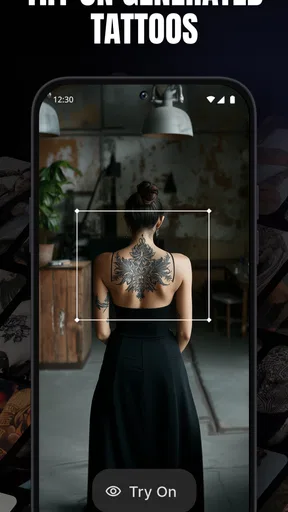
The AR try-on is most valuable as a rough placement check, not a promise of how healed ink will look. I use a preview to ask whether a design feels balanced on a body area and whether its direction makes sense with the shape of that area. I would still check the idea in ordinary lighting and discuss size, orientation and body movement with an artist. A phone preview cannot reproduce the final tattoo’s texture, scale in every posture or the artist’s adjustments to fit the skin.
There is a useful trade-off here. A quick generated option can make it easier to start a conversation, but too many variations can turn a focused idea into a pile of unrelated images. I get more value by choosing a small shortlist and identifying what each one gets right: perhaps one has the better outline, while another captures the mood. That gives a professional something to build on without asking them to copy an AI image exactly.
Worth Reading Before You Choose

EA SPORTS FC Mobile 26 Is a Bigger Football Game, but It Takes Time

Flipboard Shows What News Apps Must Do Beyond the Feed

Switching to Android Auto Means Rethinking Your Driving Routine

Google Calendar Makes a Crowded Week Easier to Manage

Ludo King Makes the Most of the Minutes Between Plans

Baby Panda World Brings Quick Play to Modern Phones, but Its Game Library Feels Busy
Unpacking the TattooInk Experience
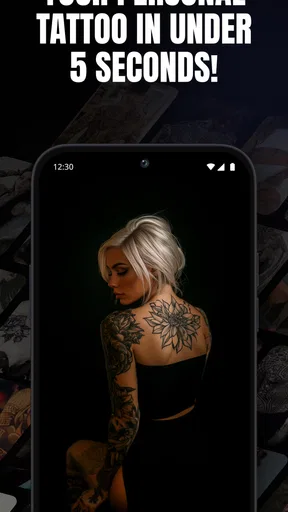
So, what’s the deal with TattooInk: AI Tattoo Generator? Imagine having a personal tattoo artist right in your pocket! This app uses advanced AI technology to generate unique tattoo designs based on your preferences. Whether you’re into intricate mandalas or minimalist line art, TattooInk has got you covered.
The app interface is a breeze to navigate. As soon as you open it, you’re greeted with a clean and intuitive layout. The main screen is your gateway to creativity with options to explore popular designs, create a new tattoo, or even get inspired by other users’ creations. It’s almost like walking into a virtual tattoo parlor without any of the buzzing sounds or ink smells.
Features Worth Highlighting
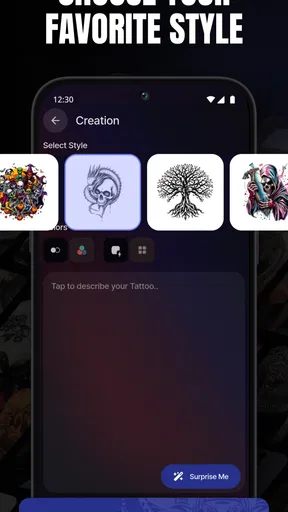
One of the standout features of TattooInk is its customization capability. You can start with a base design and tweak it to your heart’s content. Want to change the color scheme or add a personal touch? No problem! The app allows you to adjust every detail to match your vision.
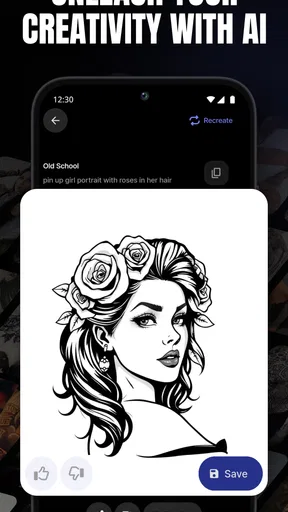
The AI’s ability to generate designs based on your input is also worth mentioning. You simply provide a few keywords or style preferences, and voila! The app conjures up something unique. It’s like having an endless tattoo idea generator that never runs out of creativity.
But wait, there’s more! TattooInk also offers an augmented reality (AR) feature. This is a game-changer for anyone hesitant about committing to a permanent design. With the AR tool, you can virtually "try on" tattoos to see how they’d look on your skin. It’s both fun and practical, giving you a sneak peek before you take the plunge.
Community and Inspiration
Another cool aspect of TattooInk is the community vibe. Users can share their creations and get feedback from others. It’s inspiring to scroll through the gallery of designs and see what fellow tattoo enthusiasts are creating. Plus, if a particular design catches your eye, you can save it for later or use it as a starting point for your own creation.
The app also hosts regular design challenges, encouraging users to flex their creative muscles. These challenges often come with themes, pushing you to think outside the box and experiment with different styles. It’s an excellent way to stay engaged and continuously find inspiration.
Working habits that make the app more useful
For an everyday use case, imagine a friend asks what kind of tattoo you are considering while you are waiting for coffee. Rather than trying to describe a vague idea from memory, you can bring up a saved reference, explain the feature you like and show a couple of alternatives. That is a modest but real advantage: the app helps turn a half-formed thought into a visual conversation without making you decide on the spot.
I would keep separate shortlists for unrelated ideas instead of trying to make one design cover everything. A personal symbol, a nature motif and a lettering concept have different design problems; mixing them too early can muddy the prompt and make comparisons less meaningful. When a result is close but not quite right, I would identify the single mismatch—such as excess ornament or an unclear focal point—and use that observation to guide the next variation.
That is also a good way to use the community gallery. I see it as a source of visual prompts, not a catalogue to copy. If I save an image, I would note what caught my attention—composition, line weight or the relationship between two elements—and then make the new design personal. This reduces the chance of bringing an artist a reference that looks appealing but says nothing about what I want changed.
Where it sits among tattoo-design alternatives
Compared with browsing image boards or searching the web, a generator is more useful when I want to explore a specific combination of subject and style rather than sift through finished examples. The gallery and challenges add a social source of inspiration, while the AR preview gives the app a practical role that a static image search does not. On the other hand, a conventional drawing app offers more direct control for someone who wants to build a design precisely, and an artist’s consultation is the stronger choice for adapting an idea to anatomy and tattoo technique.
The app is therefore most appealing to curious first-timers, people collecting ideas before a consultation, and tattoo fans who enjoy experimenting with visual directions. I would be more cautious if I needed an exact stencil for an appointment, had a very specific existing design to reproduce, or wanted guaranteed control over every line. Generated concepts can be useful starting points, but they should not be treated as a substitute for an artist’s original work or professional judgment.
Limits, cost and who should take a pass
There is a practical limit to any AI-generated tattoo concept: a striking image is not automatically a workable tattoo. Fine details can be difficult to translate cleanly, and a design that looks balanced on a screen may need changes for the chosen body area. I would bring references as conversation starters and ask an artist what should be simplified, enlarged or redrawn. If the goal is a faithful, technically prepared stencil, going directly to a professional is more efficient than polishing a generated image indefinitely.
TattooInk is free to try, and its current version is 1.1.9. Optional in-app purchases range from $3.49 to $33.99 per item, so I would check what an upgrade offers before paying and decide whether I expect to use it regularly. The app is rated for teens, and it was released on Aug 29, 2024. It is developed by leifhacks, has a 4.4 average from around 1.7 thousand ratings, and has been installed over 100 thousand times. Those figures suggest an established audience, but they do not tell me whether its particular design style will suit my taste.
It is an Android art-and-design app that runs on Android 7.0 or newer. That makes it a straightforward option for compatible Android users, while someone working on iOS should look for an alternative available for their device rather than assume this version will transfer. I would also keep the purpose in mind: it is a way to explore tattoo ideas, not a general illustration workspace or a medical tool for deciding whether a tattoo is right for you.
Final Thoughts on TattooInk
Overall, TattooInk: AI Tattoo Generator is a must-try for anyone interested in tattoos, whether you’re a seasoned ink lover or just dipping your toes into the world of body art. The combination of AI-driven design, customization options, and the AR feature makes it a standout app in its category.
Sure, it might not replace the experience of working with a professional tattoo artist, but it’s a fantastic tool for brainstorming and exploring possibilities. Plus, it’s just plain fun to play around with! So, if you’re curious about what your next tattoo could look like—or if you just want to daydream about potential designs—give TattooInk a whirl. Who knows, you might just find your next ink inspiration.
Ready to explore the world of tattoos without any commitment? Check out TattooInk and let your creativity run wild!
My verdict after weighing the trade-offs
I would recommend it when the immediate need is inspiration: testing a visual idea, comparing a few styles, or showing an artist the mood I have in mind. I would skip it as the main tool when precision matters more than exploration, or when I am already committed to a design that needs careful technical preparation. Keeping that boundary clear makes the app more helpful and avoids expecting a quick concept to do the work of a consultation.
The best habit is to leave each session with a small, explainable shortlist rather than one supposedly perfect image. Save what works, be honest about what does not, and use the AR view as a placement prompt instead of a verdict. For me, that makes TattooInk a handy companion to the real design process: approachable, enjoyable and most valuable when I bring its ideas to a skilled tattoo artist for the final decisions.
Pros
- Easy to use interface for all skill levels.
- Wide variety of design options available.
- Quick generation of unique tattoo ideas.
- Customizable features for personalized designs.
- AI-driven suggestions improve over time.
Cons
- Limited offline functionality.
- Requires in-app purchases for premium designs.
- Occasional lag in generating designs.
- Some designs lack originality.
- Ads can be intrusive during use.
FAQs for TattooInk: AI Tattoo Generator
What is TattooInk: AI Tattoo Generator?
TattooInk: AI Tattoo Generator is an app designed to help users create custom tattoo designs using artificial intelligence. The app offers a wide range of styles and inspirations, allowing users to generate unique tattoo ideas tailored to their preferences. It’s perfect for anyone looking to visualize their tattoo ideas before committing.
How does the AI feature work in TattooInk?
The AI feature in TattooInk uses advanced algorithms to generate tattoo designs based on user inputs such as style preferences, themes, and personal inspirations. Users simply provide keywords or select from options, and the AI creates a personalized design. This ensures each tattoo idea is unique and tailored to individual tastes.
Can I save and share my tattoo designs from the app?
Yes, TattooInk allows users to save their generated tattoo designs directly to their device. Additionally, you can share your creations with friends or tattoo artists via social media or messaging apps. This feature makes it easy to get feedback or collaborate with artists on finalizing your tattoo.
What styles of tattoos can I generate with TattooInk?
TattooInk supports a wide range of tattoo styles including tribal, geometric, watercolor, minimalist, and more. The app provides flexibility to explore different artistic expressions, ensuring users can find inspiration no matter their preferred style. This variety caters to both traditional and modern tattoo enthusiasts.
Is TattooInk suitable for professional tattoo artists?
While TattooInk is user-friendly and designed for general users, it can also be a valuable tool for professional tattoo artists. Artists can use it to brainstorm ideas, visualize client requests, and explore new styles. The app's AI-generated designs can serve as a starting point for custom creations tailored to client needs.


